The bigger your agentic ecosystem grows, the more “Tool Fatigue” your LLM experiences.
The “Too Many Tools” Problem

In a small project, giving an LLM five or ten tools is easy. But in an enterprise environment where you might have dozens of MCP (Model Context Protocol) servers—each exposing dozens of tools—you quickly run into a wall.
- Context Window Bloat: Tool definitions (JSON schemas) consume tokens. Sending 100 tool definitions in every request can eat up 30-60% of your context window before the user even says “Hello.”
- Model Confusion: The more tools a model sees, the more likely it is to pick the wrong one or hallucinate arguments.
- Latency: Larger prompts take longer to process and cost more money.
To build truly scalable agents, we can’t just throw every tool at the model and hope for the best.
Enter: Tool Search Discovery
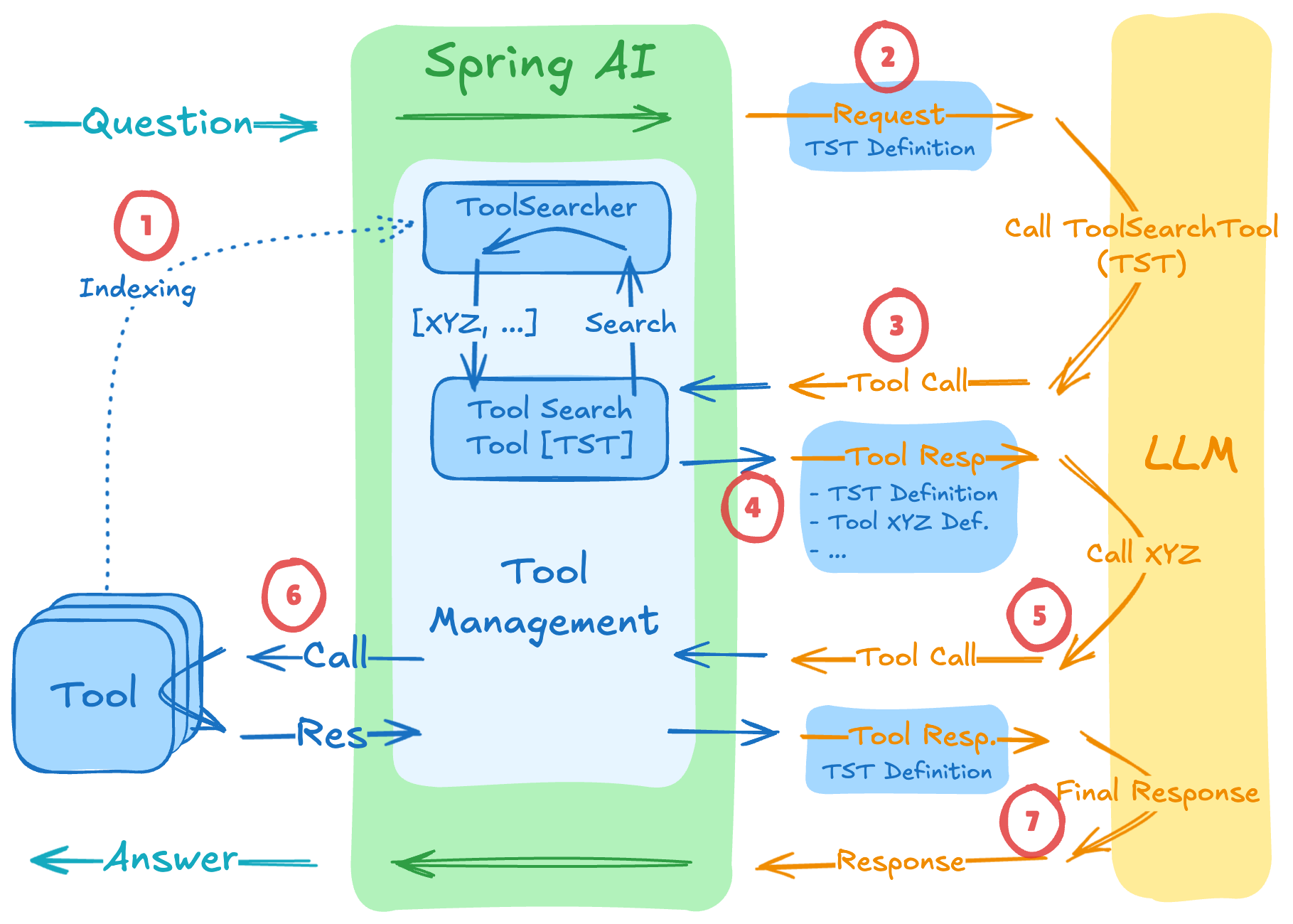
In his December blog post, Christian Tzolov detailed a “Search-then-Act” pattern using the ToolSearchToolCallAdvisor.
Instead of sending every tool definition upfront, we only send a single “Meta-Tool”: the ToolSearcher.
When the LLM realizes it needs a capability it doesn’t currently have in its context, it calls the ToolSearcher with a description of what it’s trying to do. The advisor then searches your tool registry (which can include local tools and remote MCP tools), finds the most relevant matches, and dynamically injects their schemas into the next turn.
By selectively expanding only the tools that are actually needed, Spring AI has shown token savings of 34% to 64%.
Implementation: The ToolSearcher
To set this up, you need a ToolSearcher that knows how to find your tools. You can use a simple keyword-based search or even a semantic vector search for better accuracy.
// 1. Define your tool searcher (can search across multiple MCP servers)
ToolSearcher toolSearcher = ...;

// 2. Configure the Advisor
var searchAdvisor = ToolSearchToolCallAdvisor.builder()
    .withToolSearcher(toolSearcher)
    .withMaxToolsToInclude(5) // Only inject the top 5 relevant tools
    .build();

// 3. Register with your ChatClient
var chatClient = chatClientBuilder
    .defaultAdvisors(searchAdvisor)
    .build();
When a user asks, “Can you check my last three invoices and email them to accounting?”, the flow looks like this:
- LLM sees only one tool:
search_tools(description: String). - LLM calls:
search_tools("tools for invoices and emailing"). - Spring AI searches your MCP servers and finds
InvoiceToolandEmailTool. - Advisor injects those two specific schemas.
- LLM now “sees” how to use them and proceeds with the task.
Why this is a Game Changer for MCP
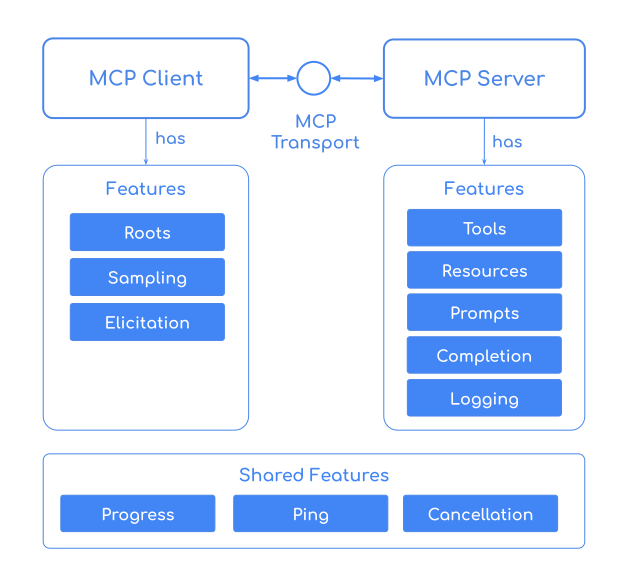
The Model Context Protocol is designed for interoperability. You might be connecting to a database MCP server, a Jira MCP server, and a Slack MCP server all at once.
Using Tool Search means your “General Purpose” agent can effectively navigate a library of 1,000+ tools while maintaining the performance and cost-profile of an agent that only has 5.
Conclusion
Scalability in AI isn’t just about bigger models; it’s about smarter context management. By moving from “Static Tool Injection” to “Dynamic Tool Discovery,” we can build agents that are both more capable and more efficient.
If you’re hitting the limits of your context window or seeing your LLM get “confused” by too many options, give the ToolSearcher a try.
That’s it! If you made it this far, thanks for reading, and I’ll see you in the next one!